
Consult | IST MALL
Copyright(c)by elecshop. All rights reserved

Consult

  • Windows unable to detect device

    M************n 2026-01-09 Hits 260
    • Hello!


      I have an issue where my controller shows up as "unkown device" in the device manager and doesn't register in any app or game. I get a ding from windows whenever it is plugged in or out. This has happened on multiple occasions and then seemingly fixed itself after a few hours. 


      What I've done to try and remedy this:

      I have tried different cables as well as the nut-locking cable both in the front and back ports of my PC and it has made no difference. 

      Windows has been updated to the latest version and I don't have this issue with any other controller. 

      I have tried both with a 3rd party xbox controller and a leverless from Haute42 and both of those run without issue while having the issue with my X Prime.

      The brook board has had its firmware updated as well.

      I have uninstalled and reinstalled the device through device manager which has made no difference.

      I have searched for updates through windows which has made no difference.

      I have restarted the PC on multiple occasions which made no difference.

      I have tried it in my dad's laptop as well where it was also unable to detect the device.


      I've had a look online and a lot of people mention the USB controller or the controller board being damaged in some way could this be the case or is there any other known issues not previously mentioned?


      I am quite lost at what to do and don't want this to occur during any tournament trips or things like that. The issue first occurred sometime in November where I brushed it off as Windows 11 throwing a fit and not wanting to work properly then two times in December and the first time now in January.


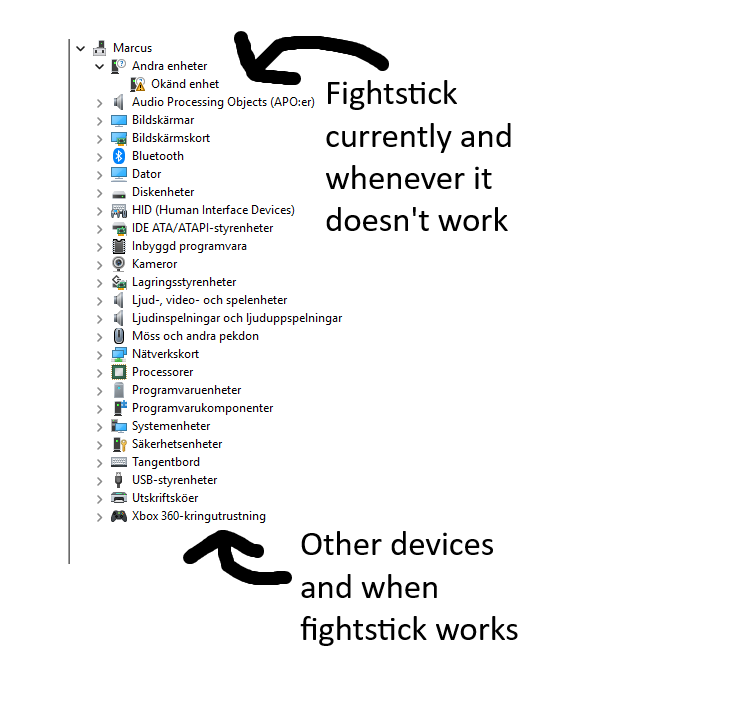
      I have linked a picture of how it looks when it normally works vs. how it looks when it doesn't work. For translation on the top it says "Other devices" and then "Unkown device" below it. At the bottom it says "Xbox 360-peripherals"


      Thank you and kind regards

      Marcus Larsson
I******L 2026-01-09
Hello,

We apologize for the inconvenience you have experienced while using the product over the past several months.
We understand that you are experiencing a recognition/detection issue with a MakeStick X Prime that has a Brook Universal Fusion Fighting Board installed.

We would like to suggest two actions:

1) Disable USB Selective Suspend in Windows Power Options
Changing this setting can help reduce joystick detection errors in Windows. Please follow the steps below:
Open Control Panel.
Go to System and Security → Power Options.
Under your current power plan (Active plan), click Change plan settings.
Click Change advanced power settings.
In the pop-up window, expand the following items:
USB settings
USB selective suspend setting
Change the setting:
For a laptop, set both On battery and Plugged in to Disabled.
For a desktop, you will usually only see Plugged in—set it to Disabled.
Click Apply → OK.

2) Test the Universal Fusion in Xbox 360 mode or PS mode
The Universal Fusion Fighting Board is recognized as an Xbox One controller in Windows and uses a different driver than an Xbox 360 controller.
Connect the USB cable while holding the R1 button to enter Xbox 360 mode.
Or, connect the USB cable while holding the Triangle button to be recognized in PS controller mode.
Please switch modes and check whether the recognition issue improves.

If the issue is still not resolved after trying the above methods, please contact us at master@istmall.co.kr

Thank you.
  • comments 0Hits 118
    found button

    Name D***********n

    Date 2026-02-09

    Hits 118

    comment 0

  • comments 1Hits 113
    Order Cancellation (20260206_RE6_0000330)

    Name A*********r

    Date 2026-02-09

    Hits 113

    comment 1

  • comments 1Hits 131
    Attach Older Order Number to This Account

    Name

    Date 2026-02-03

    Hits 131

    comment 1

  • comments 1Hits 156
    Button Color option on Makestick prime

    Name A************l

    Date 2026-01-30

    Hits 156

    comment 1

  • comments 1Hits 260
    Windows unable to detect device

    Name M************n

    Date 2026-01-09

    Hits 260

    comment 1

  • comments 1Hits 219
    Makestick X Prime email issues

    Name R**********e

    Date 2026-01-07

    Hits 219

    comment 1

  • comments 1Hits 1
    Can I change my order

    Name s********g

    Date 2025-12-16

    Hits 1

    comment 1

  • comments 1Hits 4
    help me about Order Number 20251128_AE3_0000133

    Name 建****西

    Date 2025-12-14

    Hits 4

    comment 1

  • comments 1Hits 246
    Nut-locking cable doesn't work and random "disconnects"

    Name M************n

    Date 2025-12-10

    Hits 246

    comment 1

  • comments 1Hits 224
    Why is my order stuck in Processing?

    Name S****************m

    Date 2025-12-09

    Hits 224

    comment 1

1 2 3 4 5
상단버튼