


Option
- 고무 choose :
Total Purchase Amount:
$0



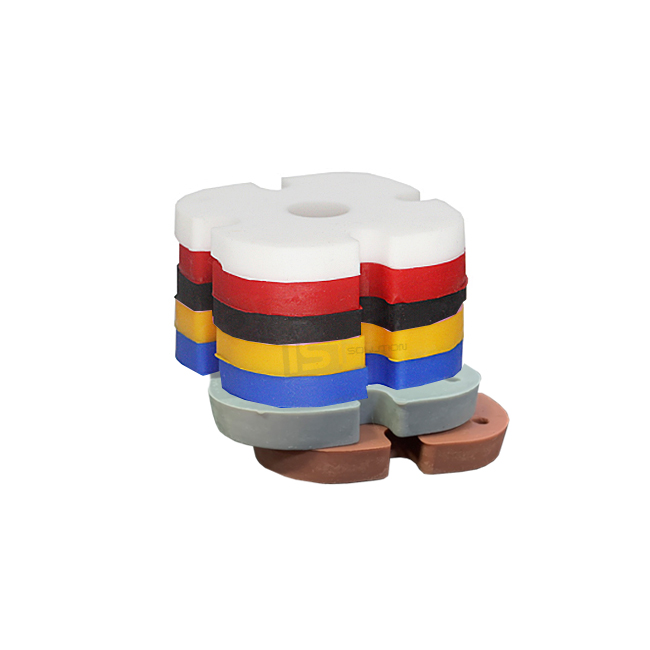
ISTMALL · LEVER PARTS
Choose a lighter or firmer feel.
Find the tension that suits your play style.
1. Lever model — Identify the lever installed inside your arcade stick.
2. Tension rating — Decide whether you want a lighter or firmer feel.
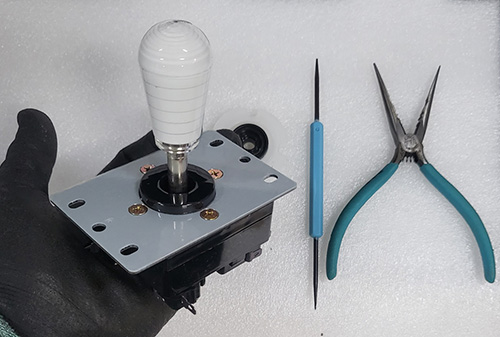
3. Tools and assembly — Some tools are required to disassemble the lever.
Package contents: One rubber grommet in your selected tension rating.
The bobbin, lever, tools, and other items shown in the photos are for installation reference only and are not included.
02 · MYOUNGSHIN GROMMET
Compatibility depends on the lever installed inside your arcade stick, not the arcade stick case or brand. Names such as MAKESTICK or Joytron alone do not identify the lever.
| Fits | Myoungshin Fanta Lever Fujin Lever Alpha Lever IST Knee Lever |
|---|---|
| Does not fit |
Crown / Samducksa levers Sanwa levers Seimitsu levers |
Compatible with the IST Knee Lever.
Not compatible with the Knee Lever Neo.
Levers with “Knee” in their name do not necessarily use the same grommet.
Not sure which model you have? Check the lever option in your order history first. If you are still unsure, contact ISTMALL through the product inquiry section with your arcade stick model and photos of the complete lever and its underside. For modified sticks, check the lever currently installed.
03 · MYOUNGSHIN GROMMET
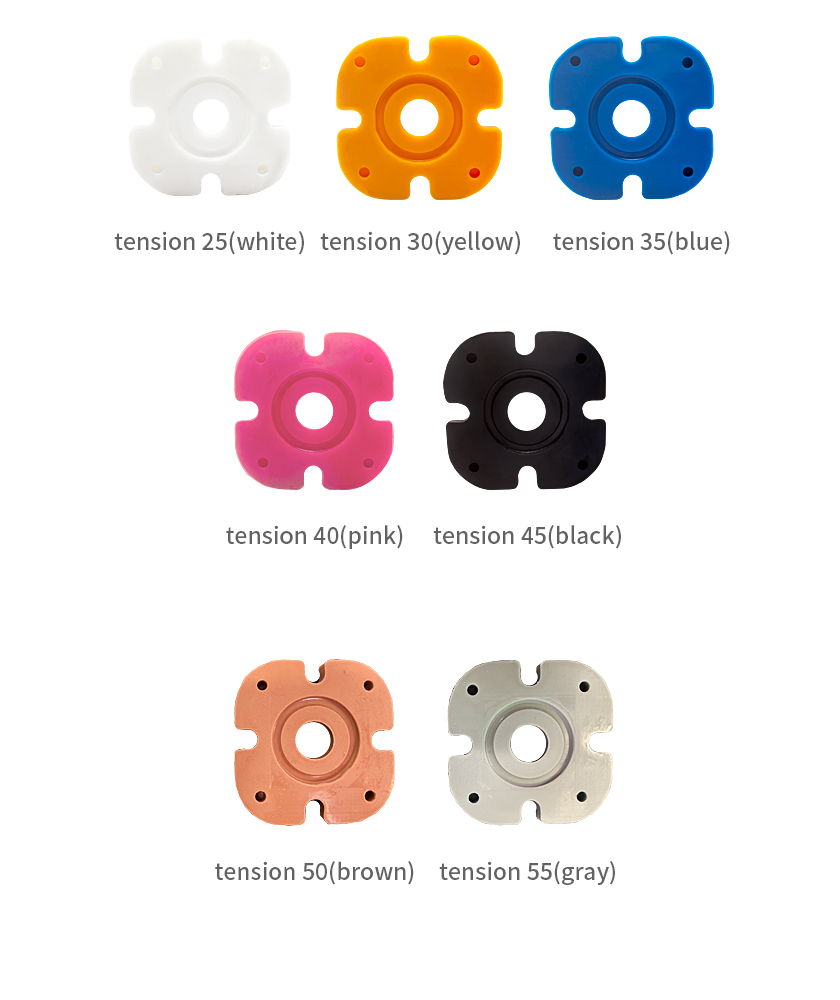
Within this product range, lower numbers provide a lighter, softer feel, while higher numbers provide greater resistance and a firmer feel. The comparisons below apply only to these Myoungshin grommets.
| Rating | Color | Relative feel |
|---|---|---|
| 25 | White | Lightest |
| 30 | Yellow | Light |
| 35 | Blue | Firmer than 30 |
| 40 | Pink | Firmer than 35 |
| 45 | Black | Firm |
| 50 | Brown | High resistance |
| 55 | Gray | Firmest |
Colors may look different depending on your display settings and the lighting used for photography.
Even with the same grommet rating, different microswitches or bobbin dimensions can change the perceived tension.
Grommets from Crown / Samducksa or other manufacturers may differ in fit and feel, even if their colors or ratings match.
04 · MYOUNGSHIN GROMMET
Use your current tension as a reference when comparing the available ratings. Decide what you want to change before making a large adjustment.
| My lever feels too stiff | Consider a rating at least two steps lower than your current one. Example: 45 → 35 |
|---|---|
| My lever feels too light | Consider a rating at least two steps higher than your current one. Example: 25 → 35 |
| I like the current feel | If you like the feel but need to replace an aging grommet, choose the same rating. A new grommet may still feel different from one that has been broken in through use. |
| I do not know my current rating | First, identify your lever model. You can inspect the grommet inside by removing the upper mounting plate. |
Higher tension may require more force to move the lever. There is no single correct rating for a particular game or technique, so choose a feel that lets you play without excessive effort.
Softer tensions have recently become more popular.
Why can the same rating feel different?
The lever design, grip, shaft, microswitches, and other components can affect the feel, as can the grommet’s age and wear. Other players’ experiences can help you compare options, but they cannot guarantee that a setup will feel the same to you.
05 · MYOUNGSHIN GROMMET
| Tools | A Phillips screwdriver, a suitable E-clip removal tool such as a small flathead screwdriver or soldering aid, and needle-nose pliers |
|---|---|
| Parts to reuse | Your lever’s existing bobbin, shaft, actuator, E-clip, and other original components. Replace any damaged or missing parts with parts suitable for your lever. |
| Photos to take first |
Photograph the lever orientation, wiring connections, mounting plate orientation, and the order of the assembled parts. Bobbin and actuator orientation often matters. Make sure you do not reinstall either part upside down. |
What is a bobbin?
It is the insert in the center of the grommet. Transfer your lever’s existing bobbin to the new grommet. The bobbin is not included with this grommet.
Replacing the grommet requires disassembly and reassembly of the lever.
If you are unable to do this yourself, you can send the lever to ISTMALL and request a replacement service.
Shipping and labor charges apply.
06 · MYOUNGSHIN GROMMET
The basic replacement procedure is outlined below. The key is to keep the grommet correctly oriented and reinstall each part in its original position.
About the photos
The E-clip and bolt photos show a Crown / Samducksa lever used in ISTMALL’s installation guide to demonstrate common assembly procedures. They do not indicate that the Myoungshin grommet fits the pictured lever. The orientation photo shows an actual Myoungshin grommet.
STEP 1
Photograph the lever and wiring connections, then make room to work.
STEP 2
Carefully remove the E-shaped retaining clip from the underside of the lever using a suitable tool. Support the grip while removing the shaft and actuator—the part that presses the microswitches. Keep washers and other small parts in their original order.
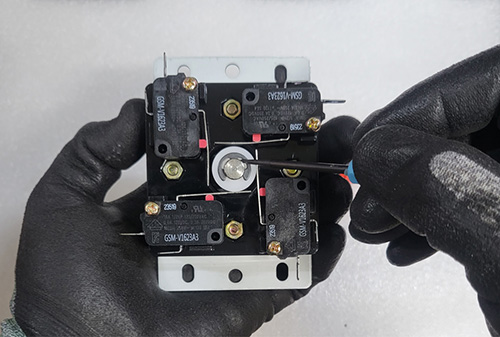
E-clips can spring out and are easy to lose. Shield the surrounding area and remove the clip slowly. Avoid scratching the shaft or nearby parts with sharp tools.
STEP 3
Undo the bolts securing the upper metal mounting plate and housing, then lift off the upper housing. On a typical four-bolt design, hold the nut on the opposite side to prevent it from spinning with the bolt. The microswitch mounting bolts do not need to be removed.
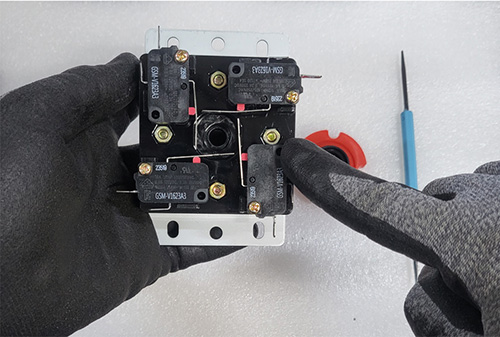
Support the nuts so they do not fall out, and note the mounting plate’s original orientation. If your model has a different design, follow its assembly procedure.
STEP 4
Remove the bobbin from the old grommet and fit it into the new one. The recessed side of both the grommet and bobbin should face upward, toward the grip and mounting plate. “Up” refers to the lever’s normal installed orientation, regardless of how you hold it on the workbench.
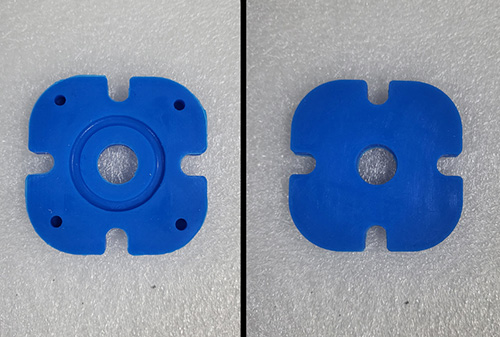
Check that the grommet’s edges and the bobbin are properly seated. Do not tighten the housing while the grommet is folded or lifted on one side.
STEP 5
Make sure the grommet sits flat, then refit the upper housing and mounting plate. Put the nuts back in place and tighten the bolts gradually, alternating between them. On Alpha levers in particular, preserve the mounting plate’s original orientation.
STEP 6
If you use a dust washer, put it in place first. Reinstall the shaft and actuator in their original order and orientation, then fully seat the E-clip in the retaining groove on the shaft.
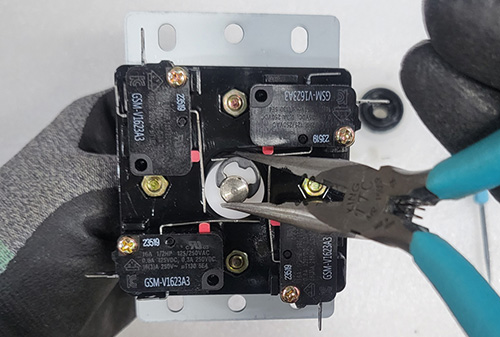
Do not use the lever with the E-clip only partly installed. Make sure it is properly seated in the groove before continuing.
STEP 7
First, move the lever by hand to check for binding. Make sure no loose parts or tools remain inside, close the case, and connect the controller. Use the game’s input display or a controller test screen to check up, down, left, right, all four diagonals, and neutral when you release the lever.
Final checks
• Does every direction register correctly?
• Does the lever return to center and stop registering input when released?
• Is any direction unusually stiff or catching?
• Are the shaft and actuator securely retained?
07 · MYOUNGSHIN GROMMET
Wear in the old grommet and variation in the new one can affect the feel. Production batches and storage conditions can also cause variation. Differences within the specified tolerance, as measured with a rubber hardness tester, are not considered defects.
Disconnect the controller. Check for a folded or poorly seated grommet, incorrect grommet or bobbin orientation, and changes to the mounting plate or actuator orientation. If the cause is unclear, contact us with photos of the lever’s internal assembly before adjusting the microswitch positions.
First, check that any connectors removed during the work are back in their original positions. Replacing the grommet alone does not change the electrical wiring order. Check the wiring, microswitches, and assembly as well as the grommet.
The grommet changes resistance and the feel of the return to center. Input feel also depends on the microswitches, shaft, actuator, and your technique. A firmer grommet does not guarantee better execution or greater input accuracy.
There is no fixed replacement interval because usage and condition vary. If the feel has changed significantly from when it was new, inspect the overall condition of the lever as well.
08 · MYOUNGSHIN GROMMET
New grommets may have scratches, small indentations, or surface discoloration from production and storage. These cosmetic marks do not affect function and are not considered defects.
A variation of approximately 2–3 points from the stated rating may occur. Grommets with the same rating can also feel different depending on their age and wear. Please take this into account when choosing a replacement.
Unlike cosmetic marks, suspected tears, cracks, severe deformation, or abnormal return-to-center behavior should be reported to ISTMALL. Send photos showing the condition and a description of the symptoms so we can assess the issue.
Lever model · Current tension · Preferred feel
If you do not know the model, include photos of the complete lever and its underside.
Please contact ISTMALL through the product inquiry section.
ISTMALL · INSTALLATION GUIDE
From disassembly and grommet orientation to reassembly.
Follow the photos one step at a time.
This guide shows the general procedure for replacing a grommet in a Korean-style lever. Most photos use a Crown / Samducksa lever for demonstration. For Myoungshin Fanta, Fujin, Alpha, and IST Knee levers, use the general sequence as a reference and check your model’s specific construction and part orientation.
A similar replacement procedure does not mean the grommets are interchangeable.
The Crown / Samducksa grommet photos are included only to illustrate the procedure.
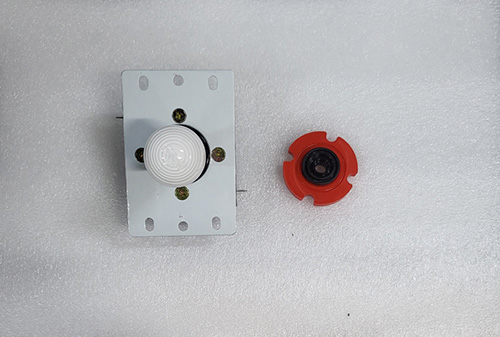
Demonstration lever and grommet. Prepare a grommet that fits your own lever.
If the lever is installed in an arcade stick, open the case and photograph the lever orientation, mounting plate position, and wiring connections.
Keep all removed screws, nuts, and E-clips together so they do not get lost.
Parts terminology
Mounting plate: The flat metal plate on top of the lever that secures it to the arcade stick.
Bobbin: The insert in the center of the grommet.
Actuator: The cylindrical part fitted to the end of the shaft that presses the microswitches.
E-clip: The small retaining clip seated in the shaft groove to keep the shaft in place.
Prepare a Phillips screwdriver for the bolts, a soldering aid or small flathead screwdriver for removing the E-clip, and needle-nose pliers for reinstalling it. You can view the tools using the links below.
View tools · Links open in a new tab
PART 1
Remove the grip and shaft assembly, then open the housing to access the grommet.
STEP 01
If the grip is installed, first remove the E-clip from the underside of the lever. Support the grip and use a suitable tool at the open side of the clip to work it slowly out of the retaining groove.
E-clips are difficult to remove by hand. Use a suitable tool.
If the grip and shaft are already removed
Skip the E-clip removal and continue to the next step. Take care not to let the tool slip and injure your hand or damage the lever.
STEP 02
After removing the E-clip, lay out the grip and shaft assembly, actuator, and other parts in order. Some models include additional washers or other parts. Take photos and record the assembly order to make reassembly easier.
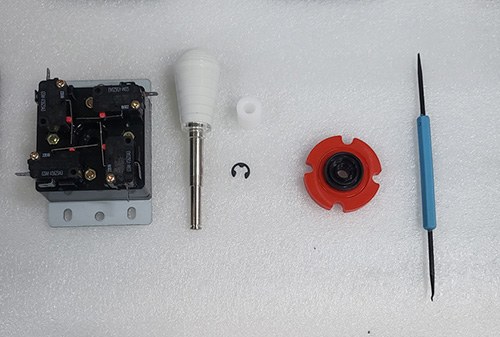
Keep small E-clips and washers together so they cannot fall or spring away and get lost.
E-clips are easy to lose
Keep a small parts tray nearby. Do not reassemble the lever with a missing or deformed E-clip; obtain a suitable replacement for your model.
STEP 03
Before loosening a mounting plate bolt, hold its corresponding nut on the underside of the lever with your finger. If the nut turns with the bolt, the bolt may spin without coming loose.
If a bolt spins freely, check whether the nut on the opposite side is turning with it.
STEP 04
Hold each nut in place while loosening the mounting plate and housing bolts with a Phillips screwdriver. The demonstration lever uses four bolts. Keep all removed bolts and nuts together.

A powered driver is shown in the photo. A regular Phillips screwdriver or stubby screwdriver can also be used.
Leave the microswitch mounting screws in place
Remove only the bolts that hold the housing together. Loosening the microswitch mounting screws can alter the lever’s input response.
STEP 05
Once all retaining bolts are removed, lift off the metal mounting plate and upper housing to expose the grommet. Photograph the mounting plate orientation and internal part positions before proceeding.
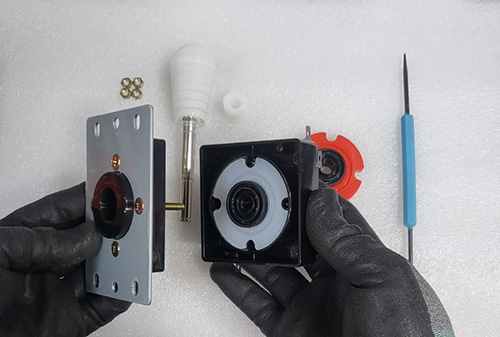
Set the housing and mounting plate down in a way that preserves their original orientation.
PART 2
Check the top and bottom of the grommet and bobbin, then seat them flat.
STEP 06
Remove the old grommet by hand and prepare the new one. When replacing a Myoungshin grommet, transfer your lever’s existing bobbin into the center of the new grommet. The Myoungshin grommet sold on this page does not include a bobbin.
“Up” means toward the grip and mounting plate
Install both the grommet and bobbin with their recessed sides facing upward. Even if you are holding the lever upside down, “up” means toward the grip in its normal installed position—not upward from the workbench.
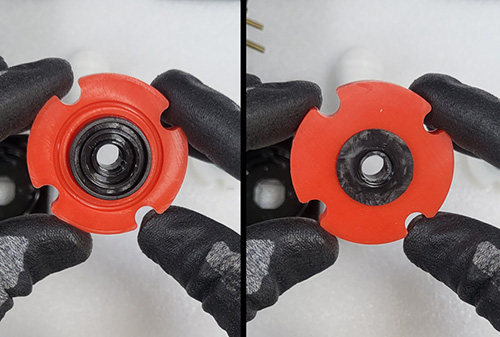
This is the Crown / Samducksa demonstration grommet. Its shape differs from the Myoungshin grommet, and the two are not interchangeable.
For the Myoungshin Fanta, Fujin, Alpha, and IST Knee levers, install the Myoungshin grommet with the recessed center facing upward. The photo below shows the top side on the left and the flat underside on the right.
Use this photo to identify the top and bottom of your Myoungshin grommet.
STEP 07
Place the correctly oriented grommet into the housing. Check that the center bobbin and the grommet’s edges are properly seated. Do not tighten the cover over a folded grommet or one that is lifted on one side.
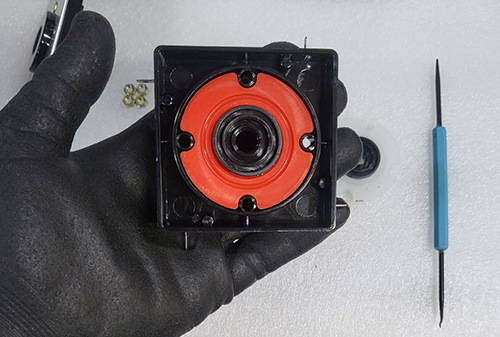
Example showing the recessed side facing toward the grip and mounting plate.
Check once more before closing
Confirm the grommet and bobbin orientation and check that the edges sit flat before refitting the upper housing.
PART 3
Reinstall the parts in their original order and orientation, then check the E-clip and controller inputs.
STEP 08
After replacing the grommet, align the upper housing and metal mounting plate with their original positions. Compare them with your earlier photos to make sure the plate has not been rotated.

Pay particular attention to mounting plate orientation on models such as Alpha levers.
Not sure about the orientation?
Do not force parts to fit. Check your photos from before disassembly. Housing and mounting plate designs vary by model.
STEP 09
Before tightening the bolts, place the nuts back into their original recesses on the underside of the lever. A tilted or missing nut will prevent the bolt from fastening correctly.
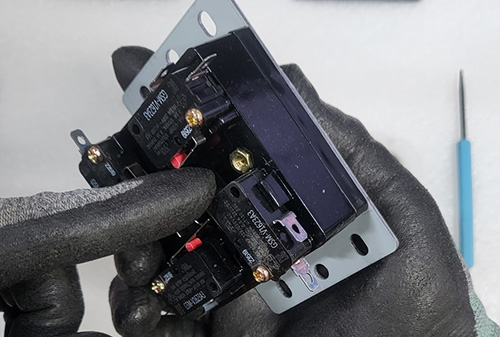
Seat each nut in its recess and support it so it cannot fall out.
STEP 10
Hold each nut from below while fastening its bolt from above. Check that the threads engage correctly, then tighten the bolts gradually, alternating between them, so the housing closes evenly.
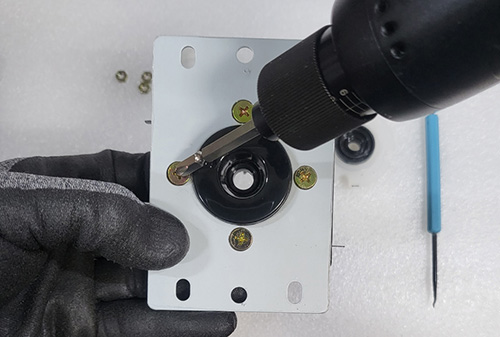
A hand screwdriver can also be used. If a bolt is misaligned or spins freely, check the nut position instead of forcing it.
STEP 11
If you use a dust washer, put it in place first, then insert the shaft with its attached grip through the center opening. Adding the dust washer afterward may require disassembly again.
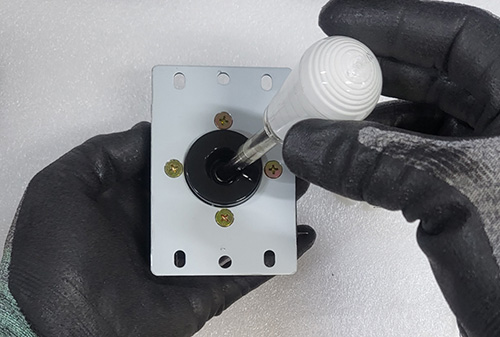
Return each original part to the same position it occupied before disassembly.
STEP 12
Fit the actuator onto the shaft protruding from the underside of the lever, opposite the grip. The actuator presses the microswitches as you move the lever. Use the correct actuator for your model and reinstall it in its original orientation.
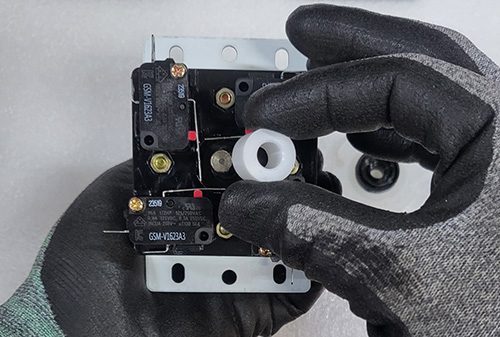
If you removed washers or other parts, reinstall them in the order shown in your photos.
STEP 13
After fitting the actuator, align the E-clip with the shaft’s retaining groove and carefully press it into place with needle-nose pliers. Keep it aligned and work slowly so it does not spring away.
Do not force the E-clip in at an angle or apply excessive pressure to the actuator.
Keep the E-clip from springing away
The clip can slip from the tool. If it does not fit, realign the clip with the groove rather than forcing it.
STEP 14
As shown below, confirm that the E-clip is properly seated in the shaft groove. A clip that is engaged on only one side or is partly installed may allow parts to come loose. Do not leave it half-fitted.
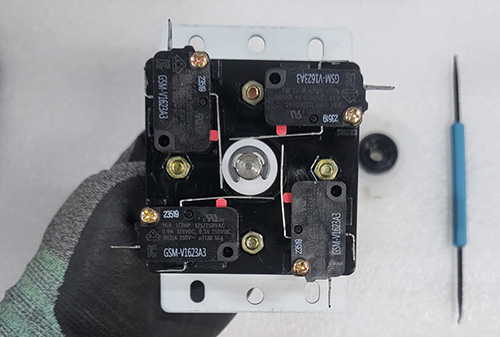
Check that the actuator is securely retained and that no parts have been left out.
STEP 15
Move the lever by hand and check for binding. If you removed it from the arcade stick, reinstall it and reconnect the wiring exactly as before. Make sure no tools or loose parts remain inside, then close the case.
Completed assembly of the Crown / Samducksa demonstration lever.
After connecting the controller, use the game’s input display or a controller test screen to check up, down, left, right, and all four diagonals. Also check that the lever returns to center and stops registering directional input when released.
Final checks
• Do all four main directions and all four diagonals register correctly?
• Does the lever return to center and stop registering input when released?
• Is any direction catching or unusually stiff?
• Are the E-clip and bolts correctly secured?
Disconnect the controller and recheck the grommet and bobbin orientation, grommet seating, mounting plate and actuator orientation, and wiring connections.
If the issue remains after checking the assembly, contact ISTMALL through the product inquiry section with your lever model and clear photos of its current condition.
Finish by checking grommet orientation and E-clip seating.
Refer to the compatibility information at the top of this product page when choosing a Myoungshin grommet.


